 Posted by
 You can spend years developing an idea, months writing a book and months working with (and paying) a PR firm to get the media interested in it… what happens next is on you.
Podcasts are closer to broadcast television than ever before. If, after all your work, you show up for the conversation with a laptop microphone and webcam sitting in the same position as when you work… and a window behind your head, the audience gets a voice bouncing around a room and a silhouette with an unflattering view up your nose explaining why your work matters. My hot take? Somewhere in your process, preparation to get your message out to the world stopped too soon. Back in 2022, I wrote, How To Be The Most Popular Guest On Every Podcast. In a post-Covid work from home world, the challenges of having guests look and sound great haven’t gone away (shockingly)… it feels like time to revisit the subject.
A podcast appearance is a shared commitment.
The host brings preparation, production and a relationship with an audience. The guest brings expertise, experience and a willingness to share. The audience brings something neither of us should take for granted: their time. Being a great guest means taking all three contributions seriously. That begins well before anyone presses record. If you are a guest, an author, an executive or a PR professional arranging these appearances, consider this both an invitation and a practical guide. I want guests to have an excellent experience. I want their ideas to come through clearly. And I want us to spend our time having the conversation we came to have. A little preparation makes all of that possible… and it’s critical to keep the audience engaged.
Start here…
Understand the show you have agreed to join. Listen to an episode (or more). Ideally, listen to enough of one to hear how the conversation develops after the introduction. Read the description… get a sense of the host’s interests… the audience and the pace. A booking confirmation tells you when to show up… it does not tell you what kind of contribution will be valuable when you get there. On my show, Thinking With Mitch Joel, we explore ideas that are changing business, leadership, technology, culture and how we understand the world around us. I am interested in people with a distinctive body of work. People with original ideas, deep expertise, meaningful experience or an unusual perspective. People who can challenge familiar assumptions and are willing to examine their own. Often, it’s a new book that introduces me to that person. The book may provide the doorway into the conversation… but it cannot be the entire conversation. I prepare extensively… I read the guest’s work… I arrive with areas I want to explore… the conversation then develops through what we each hear, question and discover.
That is why I do not really think of these as “interviews”.
The intent is to think together. A guest who understands that can relax into the conversation. There is room to follow an idea far enough that something interesting happens… and that requires a particular kind of preparation… Know your work deeply. Be ready to explain where your conclusions came from, what supports them and where they might stop being useful. Bring examples… think about the strongest objection to your argument… consider what you have changed your mind about. Those are useful things to have available in your head. Guests should be articulate and still think out loud. They can pause… they can say, “I have not considered that,” or, “Here is where I am less certain.” Disagreement is welcome…so is reconsideration. Intellectual honesty gives the audience something worth trusting.
The same care needs to extend to how that conversation is recorded.
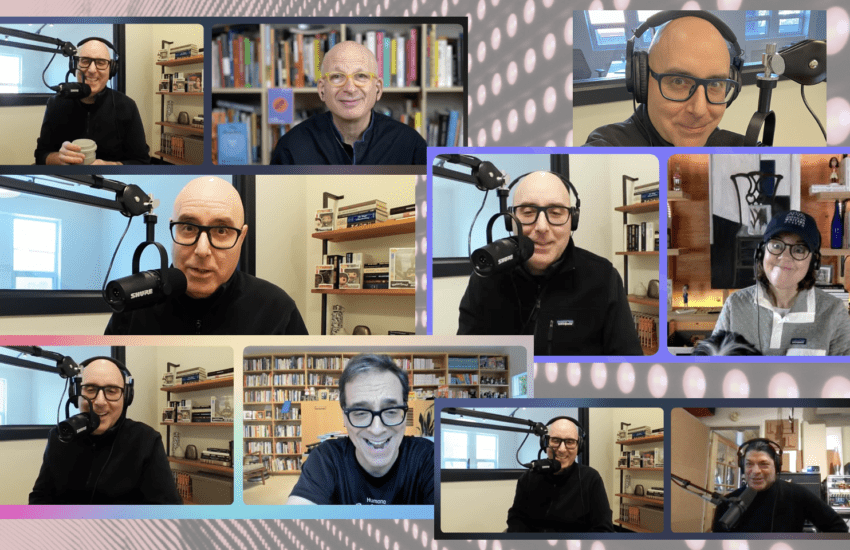
It is easy to assume that a setup that works for everyday video calls will work for a podcast. But in a work meeting, people may tolerate poor sound because they need to be there. An audience gets to leave. Good production helps people stay with a complicated idea. It lets them hear the qualification… the hesitation… the humour… and that matters. Bigger thought: Technical preparation is part of communicating well.
For Thinking With Mitch Joel, the following are the remote recording requirements (other shows may have different requirements, so always read what the host needs)…
- Computer. Use a laptop or desktop computer. Phones and tablets are not accepted for my show. Connect your computer to power so battery life does not become part of our conversation.
- Internet. A stable, high-speed connection is required. A wired Ethernet connection is strongly preferred whenever possible. If you will be using Wi-Fi, test it in the exact room where you will record and avoid competing downloads, backups or streaming during the session. Close all other applications, tabs, VPNs, and anything that might be running in the background (think about backup systems, etc.)
- Browser: Use the current version of Google Chrome. We record remotely using Riverside. Complete browser updates ahead of time and make sure Chrome has permission to access your microphone and camera. Again, close all tabs.
- Microphone. An external USB or XLR microphone is required. A computer’s built-in microphone, a webcam microphone, AirPods and other wireless earbuds are not suitable for recording. An XLR microphone also needs an appropriate audio interface and cables. My go to is the Shure MV7+ (this one has both USB and XLR).
- Headphones. Wired headphones or wired earbuds are required. Speakers can send the host’s voice back into your microphone, creating echo. The software trying to suppress that echo can also cut off parts of the conversation when we speak at the same time. Separate headphones and an external microphone help us hear each other clearly and respond naturally. I prefer something discreet on camera… there are some great in-ear (and super cheap) ones that are nearly-invisible when you’re on camera: MEE Audio Sport-Fi M6 Noise Isolating in-Ear Headphones.
- Camera. Use an external webcam or a high-quality built-in camera capable of recording in HD. A 4K camera is preferred 1080p is acceptable. These two work great (if you’re not investing in a more professional camera): Insta360 Link 2C Pro or Elgato Facecam 4K.
- Location. Record in a quiet, private room with the doors and windows closed. Cafés, shared offices, hotel lobbies and other public spaces are not suitable.
- Framing: Position the camera at approximately eye level and frame yourself from roughly the chest upward. Keep the camera stable. Move the host’s video window close to your camera so you can follow the conversation without constantly looking far away from the lens. If you really want to nail this, invest in the Elgato Teleprompter.
- Lighting. Face a window or a soft light source. Keep the main light in front of you and make sure your face is evenly lit. Avoid having a bright window behind you. A simple lighting setup can make a significant difference.
- Background. Use your actual surroundings. Do not use a virtual background or heavy background blur. Choose a frame with as little visual distraction as possible.
- Room sound. A furnished room with rugs, curtains, books and other soft surfaces will generally be more suitable than a room full of bare, reflective surfaces. Listen for fans, air conditioning, traffic, appliances and other noises you may have learned to ignore.
- Microphone position. Start with the microphone approximately 10 to 20 centimetres from your mouth (measure about a fist’s length), then adjust for the microphone and the sound check. Keep the distance reasonably consistent while talking.
- Use AI. If you’re unsure about your framing, lighting, background or equipment placement, show an AI assistant that accepts images/videos your setup. Ask what you could improve with what you already have. Treat the suggestions as a starting point, then make a test recording… and keep getting its feedback. It can definitely help you formulate the best situation with what you have. This may take some time, but it is worth the effort and AI provides some excellent insights.
You do not need to turn your home into a broadcast studio.
Owning a microphone and recording through that microphone are separate things. It can be plugged in, sitting on the desk and looking very professional, but if you don’t sound your best… what’s the point? The most useful preparation is a rehearsal of the technical setup with a friend or colleague. Well before the recording day, do some tests using the computer, microphone, headphones, camera and room you intend to use. Get comfortable in that space. Once we’re recording we want all of the tech to melt away so that the conversation can take us everywhere.
For PR professionals… this is part of preparing your clients for success.
Forwarding the requirements and getting the booking is a necessary step… but following up establishes whether they have been understood and acted on. But… maybe even before taking on a new thought leadership client, PR professionals should know if the client…
- Has the recording requirements and acumen to succeed when the show goes live.
- Understands that these types of conversations and media experiences extend beyond the standard book banter and promotional material.
- Is working towards making each and every appearance something worth the intended audience’s interest.
- Has spent some time doing both media training and worked on how to “show up” in longer format video-based conversations.
Let’s protect and value the opportunity everyone is working so hard to secure.
If you reach out to a podcaster and they agree, don’t suddenly turn it back on the podcaster to provide demographic, download information, audience analytics and more. If you reached out to a show, it’s because you’ve already ascertained it’s a fit for your client. It’s just lazy to do it the other way around. Provide the book (in digital format) or relevant material with enough lead time for the host to read it. Include a concise biography, the correct pronunciation of the guest’s name, useful links and suitable photographs. Explain why this guest’s work might matter to this audience. If there are subjects the guest cannot discuss, raise those before booking so we can establish whether the conversation is a fit. For my show expect an unscripted exchange… I prepare areas of inquiry, and the questions develop as we speak (said another way: no questions are provided in advance).
Once we start, bring your full attention.
No email… no texting… no quiet work on another screen… attention is visible… it is audible, too. Give the conversation space. A brief pause can help both people avoid talking over each other. I am far more interested in understanding how someone arrived at an idea than hearing the same patter replicated from show to show. Remember, too, that people may encounter the conversation long after it was recorded. Give dates and events enough context to make sense later. Avoid assuming that a listener knows what “this week” refers to or can see something you are holding up to the camera… help the conversation remain useful.
I promise you this: depth of preparation and a thoughtful conversation… and you should expect that from every host.
The audience deserves the same care from both of us. No one person can guarantee a brilliant exchange… the interesting part happens between two people, and some of it has to remain unpredictable. Preparation buys us the freedom to forget about the equipment and become absorbed in the ideas and conversation. If your work is worth asking people to spend an hour with, give them every opportunity to hear it (and see it) clearly.
Now, let’s see where the conversation goes…
Before you go… ThinkersOne is a new way for organizations to buy bite-sized and personalized thought leadership video content (live and recorded) from the best Thinkers in the world. If you’re looking to add excitement and big smarts to your meetings, corporate events, company off-sites, “lunch & learns” and beyond, check it out.
 Never another podcast episode or article